
MySafeRide - Manage your rides
SafeRide IncMedical
3.9514.00 Reviews
- Version
- 1.2.2
- Installs
- 100.00K
- Age Rating
- Everyone
Screenshots
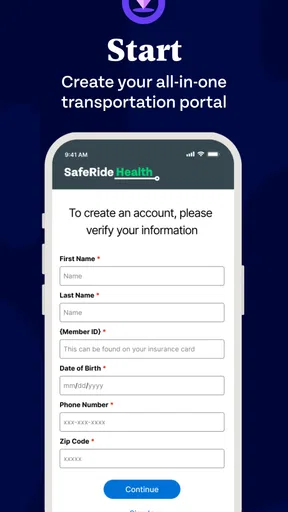
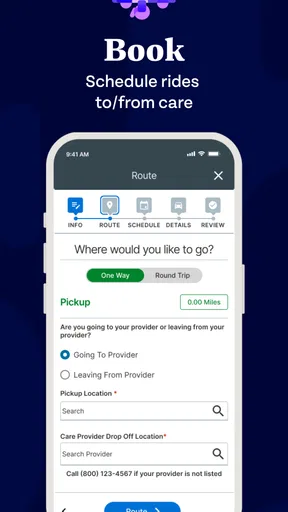
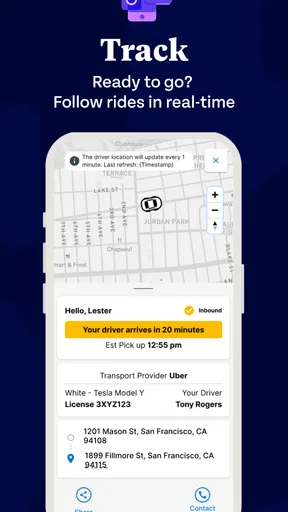
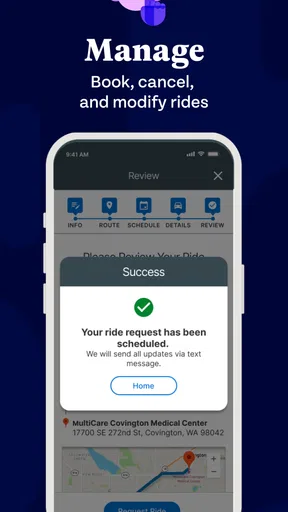
Our Review of MySafeRide - Manage your rides
 Analysis by Appyee
Getting a ride to a medical appointment can be stressful enough without adding phone calls, repeated explanations, or uncertainty about where the booking stands. MySafeRide is built for that particular problem: it helps health plan members book and manage transportation connected to their medical care. After spending time with it, my view is straightforward: it is most useful when your health plan already supports the service and your main need is keeping eligible rides organized, rather than finding any taxi or rideshare in your area.
The app is free, carries an Everyone age rating, and comes from SafeRide Inc. It belongs in the medical category, but I would think of it less as a health-tracking tool and more as a practical transportation companion. That distinction matters. It does not replace a general rideshare app, and it is not designed around browsing nearby drivers or comparing fares. Its value comes from connecting ride arrangements with the transportation benefit available through a participating health plan.
How MySafeRide fits into a medical transportation routine
The first thing I noticed is that the app makes more sense as part of a larger appointment routine than as a standalone travel app. A normal rideshare service starts with a location, destination, vehicle choice, and payment method. MySafeRide starts with the member relationship: whether the person is eligible for transportation through a health plan and whether the requested trip fits that program’s process.
That makes the app especially relevant for appointments that are easy to overlook in a busy week. A recurring clinic visit, a specialist consultation, a therapy session, or a follow-up appointment may not be difficult to reach in theory, yet arranging transportation can become a barrier when driving is not possible. Keeping those ride details in one place is the central reason to use this app.
In practical terms, I would open it before an appointment rather than waiting until the morning of the trip. I would check the ride information, confirm the intended date and destination, and make sure I understood what had been arranged. That small habit is more important here than it would be with an ordinary on-demand ride, because a medical trip is usually tied to an appointment window that cannot be casually moved.
A realistic example is a member who has an early appointment at a clinic across town. Instead of treating transportation as an afterthought, the member can use the app to manage the ride connected with the health plan benefit, review the arrangement, and keep the return journey in mind. The return ride deserves special attention: medical visits often finish later than expected, and a person may leave tired, uncomfortable, or unable to make several calls. Planning both directions early is one of the most useful habits I would take from using this kind of service.
The strongest reason to choose it
MySafeRide’s strongest point is focus. It is not trying to become a universal travel marketplace. For an eligible health plan member, that narrower purpose can remove some of the guesswork involved in arranging non-emergency medical transportation. The app’s job is connected to a specific need, and that can feel more manageable than switching between a clinic, an insurer, and a transportation provider.
I also appreciate that the app treats ride management as an ongoing task rather than a single booking moment. Medical transportation is rarely just “take me from here to there.” A user may need to think about the appointment time, the pickup timing, the destination, the return trip, and whether the arrangement still matches the day’s plan. An app designed around managing rides is better suited to that reality than a general service that assumes every journey is spontaneous.
There is a useful trade-off here. General rideshare apps are often more familiar and may feel faster for ordinary errands, but they are usually organized around immediate availability and direct payment. MySafeRide is more relevant when the ride is part of a covered transportation process. If eligibility and scheduling are already handled through the health plan, using the dedicated app can be less confusing than trying to arrange a regular ride and hoping it fits the benefit.
That said, I would not assume that opening the app automatically solves every transportation problem. The health plan connection remains important. A person who is not an eligible member, or who needs a trip outside the plan’s transportation rules, may find that a normal taxi, public transit planner, or rideshare service is a better fit. The app’s focus is a strength only when the user’s situation matches it.
Small workflow choices that make a real difference
One non-obvious lesson is to separate “booking a ride” from “being ready for the ride.” Even if the app shows that a trip has been arranged, I would still review the appointment address carefully. Medical systems can have several entrances, buildings, or campuses, and a destination that looks correct at a glance may not be the most useful pickup or drop-off point. The app can help manage the ride, but the user still needs to provide practical location details.
A second useful workflow is to check the return plan before leaving home. People often focus on the outbound ride because it is connected to the appointment start time. The return trip can be more complicated, especially when a consultation runs long. Managing both legs together gives the user a better chance of avoiding a rushed call from a waiting room or an uncertain trip home after the appointment.
Third, I would use the app as a record of what has been arranged, not as a substitute for personal preparation. Keeping the appointment details, clinic contact information, and any instructions from the health plan available separately is sensible. If a ride needs attention, having those details ready can make a conversation with support or the clinic much easier than trying to reconstruct everything from memory.
These habits may sound simple, but they reveal where the app provides genuine value. It is not necessarily about adding exciting technology to transportation. It is about reducing avoidable disorder around a trip that may already involve health concerns, mobility limitations, or dependence on another person’s schedule.
Where the experience can be frustrating
The main weakness is that the app’s usefulness depends heavily on circumstances outside the app itself. A member may install it expecting the same instant control offered by a consumer rideshare service, only to discover that the health plan, eligibility rules, or scheduling process determines what can actually happen. That can make the experience feel less direct, especially for someone who simply wants a car immediately.
This is also why I would be careful about treating the app as a last-minute solution. Medical transportation often requires planning, and an app cannot remove every program rule or timing constraint. If an appointment has changed suddenly, the user may still need to follow the health plan’s process rather than assuming that a few taps will produce a new ride. My recommendation is to make changes as soon as they are known and to avoid relying on the app for an urgent, same-minute journey.
The interface may also feel less familiar to people who are used to general travel apps. Users accustomed to seeing vehicle icons, live driver movement, fare estimates, and instant pickup choices may find a health-plan transportation workflow more administrative. That is not automatically a design failure; it reflects a different purpose. Still, it can create a learning curve for older adults or anyone who rarely uses mobile apps.
For that audience, the best approach is to set up the app when there is no appointment emergency. A family member or trusted helper can sit with the user, go through the account and ride process, and write down the steps in plain language. I would not wait until the user is already late for an appointment to learn how the service works.
Another limitation is the emotional expectation that comes with medical travel. A person may want certainty about pickup timing, driver communication, accessibility, or what happens if the appointment runs over. The app can organize ride information, but users should not assume that every concern is answered simply by having a digital booking. When a trip involves a wheelchair, mobility aid, a caregiver, or a complicated clinic entrance, confirming the practical arrangements through the appropriate health plan or transportation contact remains important.
That is the key trade-off: MySafeRide can centralize the member’s ride-management task, but it does not turn a health benefit into a fully flexible private car service. If the user values immediate availability above all else, a conventional taxi or rideshare may be more suitable, even if it means handling payment independently.
Who will benefit most from it
I think the best audience is health plan members who regularly attend medical appointments and want a dedicated way to manage transportation connected to that coverage. It is particularly sensible for people who do not drive, cannot depend on relatives for every trip, or find repeated phone arrangements difficult to keep track of.
It may also help caregivers. A relative who coordinates appointments can use the ride-management process as one part of a broader schedule, checking transportation before the appointment day and helping the member avoid missed details. The caregiver still needs to stay involved when the rider has accessibility or communication needs, but having a dedicated app can make the transportation portion easier to organize.
The app is less compelling for someone who only needs occasional local travel and already has reliable access to a car, public transportation, or a favorite rideshare service. It is also not the right first choice for emergencies. Medical emergencies require emergency services, not a scheduled transportation app. Similarly, anyone looking for airport trips, restaurant outings, price comparisons, or spontaneous city travel will probably be happier with a general mobility app.
People who are uncomfortable with smartphones should not automatically dismiss it, but they should approach it with support. The age rating is Everyone, and the app is available at no charge, yet those facts do not guarantee that every user will find the workflow effortless. The real question is whether the person can comfortably manage a health-plan-related ride on a phone, either independently or with help.
MySafeRide has reached over one hundred thousand installs, which suggests that it serves a meaningful group of people, but its average rating of 3.3 shows that the experience is not universally smooth. I read that rating as a reason to set realistic expectations rather than as an automatic rejection. A specialized app can be valuable to the right member even when it is not polished enough to satisfy every user.
Version, availability, and day-to-day confidence
The app was released on December 13, 2024, and the current version is 1.1.0. It works on Android 6.0 and later, so compatibility should be reasonable for people using older supported Android devices. I would still check the app on the actual phone that the member carries, especially if that phone is older or shared with a caregiver.
Because this is a medical transportation tool, reliability matters more than novelty. I would update it when a new version is available, open it before an important appointment, and avoid discovering account or ride problems at the last possible moment. Those are ordinary precautions, but they are more valuable here than experimenting with the app during a stressful morning.
The number of ratings is around seven hundred fifty, with more than four hundred written reviews. That gives prospective users enough public feedback to see that opinions vary, while still leaving room for individual experiences to differ by health plan and transportation situation. In my judgment, the rating should encourage a trial run before depending on the app for a particularly important appointment.
A sensible first test would be a non-urgent appointment that is still important enough to expose any confusion in the process. After using it once, I would ask myself practical questions: Could I find the ride information without help? Did I understand what was arranged? Could I handle a change of plans? Did the process fit the way my health plan manages transportation? Those answers are more useful than judging the app only by its appearance in the store.
My final recommendation
MySafeRide is a focused medical transportation app with a clear audience. I would recommend it to eligible health plan members who need an organized way to book and manage rides for appointments, especially when transportation is a recurring challenge. Its best quality is not broad flexibility; it is the attempt to place health-related ride planning in a dedicated workflow.
I would not recommend it as a replacement for every transportation option. It is a poor match for emergencies, spontaneous trips, ordinary errands, or users who need the instant marketplace experience of a general rideshare service. It can also feel limiting when a health plan’s rules or scheduling process do not match the user’s expectations.
Still, for the right person, the narrow focus is meaningful. My experience suggests that the app works best when used early, with both outbound and return travel considered, and with appointment and accessibility details checked before the day begins. If your health plan supports the service, MySafeRide is worth trying as a practical appointment-planning tool, but I would test it before making it the only plan for an important medical visit.
SafeRide Inc has chosen a useful problem to address, and the free access lowers the barrier to trying it. The current version is not something I would praise without reservations, but it can make a difficult routine more manageable for members who fit its intended use. My verdict is cautiously positive: choose it for health-plan transportation management, keep a backup plan for time-sensitive trips, and do not confuse a specialized medical ride service with a general-purpose travel app.
Privacy and Permissions
See what permissions an app requests and how it handles your data.
- Location
- approximate location (network-based), precise location (GPS and network-based)
- Photos/Media/Files
- read the contents of your USB storage, modify or delete the contents of your USB storage
- Storage
- read the contents of your USB storage, modify or delete the contents of your USB storage
- Other
- view network connections, full network access, draw over other apps, control vibration, Google Play license check
Verdict
Strengths of MySafeRide - Manage your rides
- Quickly organize ride details and schedules in one place.
- Useful for keeping track of regular trips and transportation routines.
- Simple interface makes essential ride information easy to find.
- Can help reduce missed rides through timely trip reminders.
- Convenient for users managing multiple rides or travel arrangements.
Limitations of MySafeRide - Manage your rides
- Some features may depend on an active internet connection.
- Ride information may require manual updates when plans change.
- Limited usefulness if your transport provider is not supported.
- Notifications can be missed if background permissions are restricted.
- Users may need to review privacy settings before adding trip details.
Similar Picks in This Category
View All
WebMD: Symptom Checker
WebMD, LLC4.1

Microphone Amplifier
DOSA Apps4.2

Anatomy Learning - 3D Anatomy
3D Medical OU4.5

Period Tracker and Calendar
SimpleInnovation4.9

GoodRx: Prescription Coupons
GoodRx4.8

CVS Health
CVS Pharmacy4.5
Frequently Asked Questions
What is MySafeRide - Manage your rides used for?
MySafeRide - Manage your rides is designed to help users organize and monitor transportation details in one place. Depending on the services supported in your region, you may be able to view ride information, keep track of scheduled or completed trips, and manage related details more conveniently. It is especially useful for people who want a clearer overview of their regular rides without relying on scattered messages or notes.
Is MySafeRide - Manage your rides free to download and use?
The application may be available to download at no initial cost, but some features or services can depend on the provider, account type, location, or associated transportation program. Before using it extensively, check the current listing in the Google Play Store or Apple App Store for pricing, subscriptions, and possible in-app charges. Transportation costs themselves are generally separate from the app.
Do I need an account to use MySafeRide - Manage your rides?
An account may be required to access personalized ride information, connect the app with a transportation service, or synchronize details across devices. Registration can involve entering contact information and other details needed to identify your rides. If you are downloading the app for someone else, review the sign-in and permission requirements first, since access may depend on an organization or service provider.
Does MySafeRide share my location or personal information?
Because ride-management applications can handle trip details, contact information, and sometimes location-related data, you should review MySafeRide’s privacy policy before granting permissions. The exact information collected may vary by device, account, and enabled features. Only allow access that is necessary for the functions you plan to use, and check the app-store privacy section for the latest disclosure.
What should I do if my ride information is missing or incorrect?
First, confirm that you are signed in to the correct account and that your internet connection is working. Refresh the app and check whether the ride was booked through the supported service or organization. If the information still does not appear, contact the relevant transportation provider or MySafeRide support using the official channels. Avoid relying on the app alone for urgent pickup or schedule information.
